![codaworx-background-transparency (4).png]](https://knowledge.codaworx.com/hs-fs/hubfs/codaworx-background-transparency%20(4).png?height=40&name=codaworx-background-transparency%20(4).png)
Table of Contents
1. Access Your Dashboard
- Logging In: Go to CODAworx and sign into your account. Create one if you don’t have one already.
- Note: You need to log in using the exact email address where you received the jury invitation. Double check with your call administrator to ensure the email used is correct.
- Locate the Round: Once signed in, a pop-up alert should automatically appear directing you to your active scoring panel.
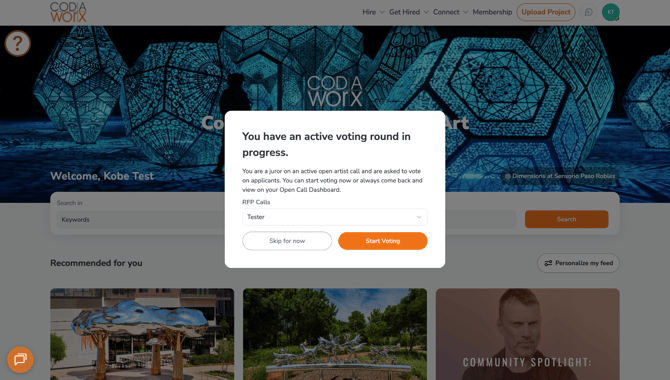
If you choose to “Skip for Now,” open a new window and log into CODAworx. The pop-up window will reappear after opening a new window and logging back into your account.
2. Review and Score Applicants
- Click on the first applicant's name at the top of the list to open their complete portfolio, resume, and statement.
- Review the materials and fill out the review on the right-hand panel.
- (Optional) Leave a written comment in the provided text field to clarify your feedback for the administrator.
- Click “Next Applicant” to save your scores and comments and move forward.
- NOTE: You must fill out every single category field on the scorecard before moving on. Commenting is optional. Do not click "Next Applicant" or refresh the page with an incomplete scorecard. Skipping fields or saving partial forms can cause loading errors and lock you out of the scoring page entirely.
3. Next Steps
Once you’ve finished voting, your call administrator will be able to see the scoring, notes, and completed reviews you’ve left on applicants.
Your call administrator may open a new round of voting to continue to narrow down the search for a qualified artist. You do not need to create a new account. However, open a new CODAworx tab and follow the same steps to access the new round.
FAQs
What if I don’t finish voting by the deadline that is set up by the administrator?
If you do not finish voting by the deadline that is set by the administrator, let your administrator know to filter out your voting results when considering applicants to push forward. This will ensure equal and fair voting across the applicants.
I don’t see an invite link to vote. Where can I find it?
Double check that the link has not been left in your spam folder. Otherwise, the administrator of the call can invite you with a direct link. They can then email you the link to vote.
See how to do it here on Step 5.