---
title: New Feature Launches
description: We’re thrilled to announce the launch of our new CODAworx software updates, designed to connect all members of the public art ecosystem and foster more commissions.
---
[Skip to content](https://knowledge.codaworx.com/knowledge/whats-new-with-the-launch-of-the-new-codaworx-platform#main-content)
English
Show submenu for translations
[Contact us](https://knowledge.codaworx.com/knowledge/kb-tickets/new?hsLang=en)
![codaworx-background-transparency (4).png\]](https://knowledge.codaworx.com/hs-fs/hubfs/codaworx-background-transparency%20(4).png?height=40&name=codaworx-background-transparency%20(4).png)
Open main navigation
Close main navigation
- English
Show submenu for translations
- [Contact us](https://knowledge.codaworx.com/knowledge/kb-tickets/new)
- [Go to codaworx.com](https://codaworx.com/)
[Go to codaworx.com](https://codaworx.com/)
Search the FAQs
- There are no suggestions because the search field is empty.
1. [CODAworx FAQs](https://knowledge.codaworx.com/knowledge?hsLang=en)
2. [General](https://knowledge.codaworx.com/knowledge/general?hsLang=en)
# New Feature Launches
## CODAworx is committed to improving the user experience across all spaces. Below, you'll be able to see new feature launches we're making.
**What's New on CODAworx July 2026**
We've updated several parts of the platform to fix problems commissioners, artists, and jurors have run into most often — especially around submission deadlines, editing applications, and working across time zones. This article covers five changes:
1. Submission deadlines now use exact time, down to the minute
2. You can edit your application after submitting
3. Geographic filtering improves discoverability
**COMING IN AUGUST**
1. Jurying is managed by round
2. Help now lives in the top navigation
---
**1. Submission deadlines now use exact time, down to the minute**
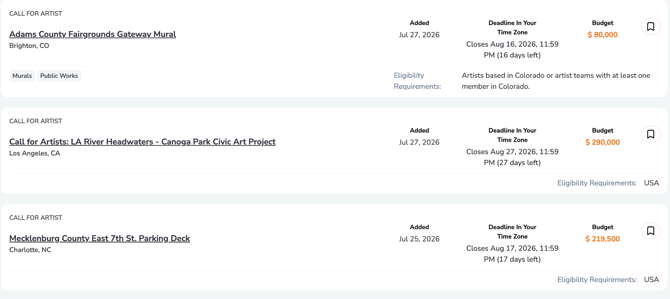
We've heard this consistently in support tickets: artists lose track of exactly when a call closes, especially across time zones. A deadline that reads "closes Friday" leaves too much room for confusing: is that midnight in New York? Midnight where the commissioner is based? By the time an artist finds out, the window is already gone. Open calls now use a real date, time, and time zone, not just a calendar day.
**For Commissioners:** When you set Application Open and Application Close, you'll also choose a time zone. That exact time is what the call is scheduled, down to the minute.
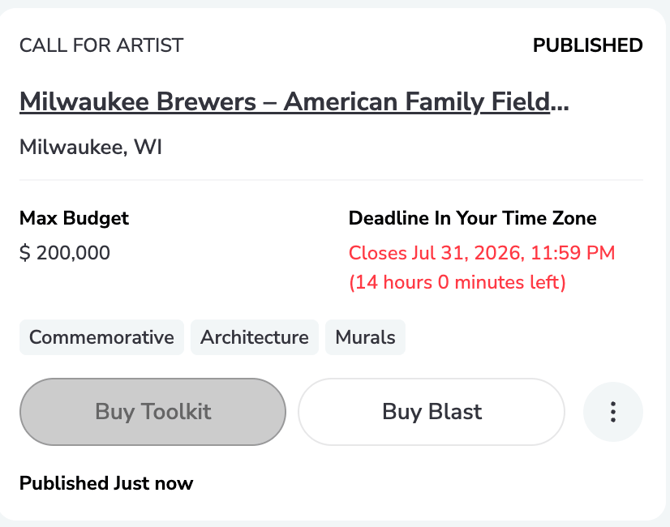
**For artists (on the call detail page)** You'll see:
- Opens and Closes converted to your local time zone
- Time remaining, or a clear note that the call hasn't opened yet / has closed
Everyone's application closes at the same exact time. It's only displayed in whatever time zone is relevant to you. No more "was it still open?" guesswork for artists applying from a different region than the commissioner.
---
**2. You can now edit your application after submitting**
Previously, once you hit "Submit Application", that was final. If you noticed a typo, wanted to swap an image, or just recently wrapped up a new project, your only option was to contact support.
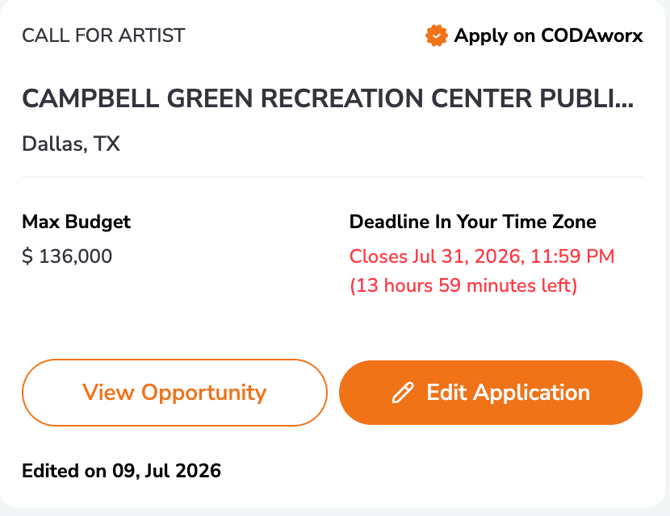
Now, you can go back and edit your submitted application any time before the call's deadline closes. No need to withdraw and resubmit, and no need to email us to fix something small. This is available directly from your application in progress, and any changes you make are saved automatically as part of your existing submission.
---
**3. Geographic filtering improves discoverability**
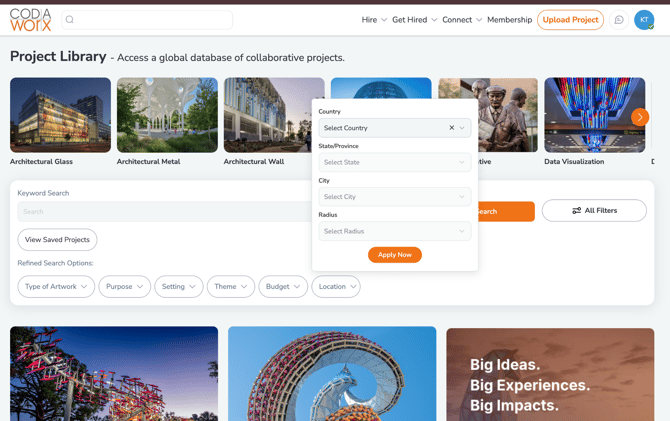
Commissioners can now filter and search for artists by location. If you're an artist, this means a complete profile, particularly your location and industry details, makes it significantly easier for commissioners to find you for opportunities relevant to where you work. If your profile is missing this information, now's a good time to fill it in.
Lots of commissioned work require geographic restrictions. Commissioners have been asking to us to include a location filter on our Project Library and Creative Directory to make it easier to find artists in their area, add them to a curated list of artists, and reach out to them when an opportunity arises that matches their expertise.
---
**COMING IN AUGUST**
**4. For Commissioners: Jurying is managed by round **
On **Manage Call → Selection Process**, jury work will be organized around each round of your selection process, rather than a single separate pool of jurors. For every round, you can:
- **View Round** — review the round and its applicants in context
- **Edit Round** — update round details and scoring
- **Add or Remove Jury Members** — manage who's scoring that specific round
Invites and voting links are shared directly from the round, so each stage of jurying has its own clear roster and access path.
**Important for jurors:** you must sign in with the same email address you were invited with. If you land on the wrong account, you'll see a "Wrong Account?" option to switch before voting.
---
**5. Help is in the top navigation**
Looking for guides, how-to videos, or support? Open **Help** from the main header menu at any time.From Help, you can:
- Jump into role-based starting points
- Browse Best Practices by audience
- Open How-To Videos and Quick Reference Guides
- Reach Contact Support in one click
Feature Updates — articles like this one — will also live here going forward, so there's one place to check for what's changed on the platform.
---
As always, we're iterating based on how you actually use the platform. Send feedback anytime through emailing **info@codaworx.com**.
- [Contact Us](https://knowledge.codaworx.com/knowledge/website-feedback-portal)
[.png?width=38&height=24&name=codaworx-background-transparency%20(4).png "Chill listening crop-3")](https://www.codaworx.com)
Copyright © 2026, CODAworx